☕Key Features☕
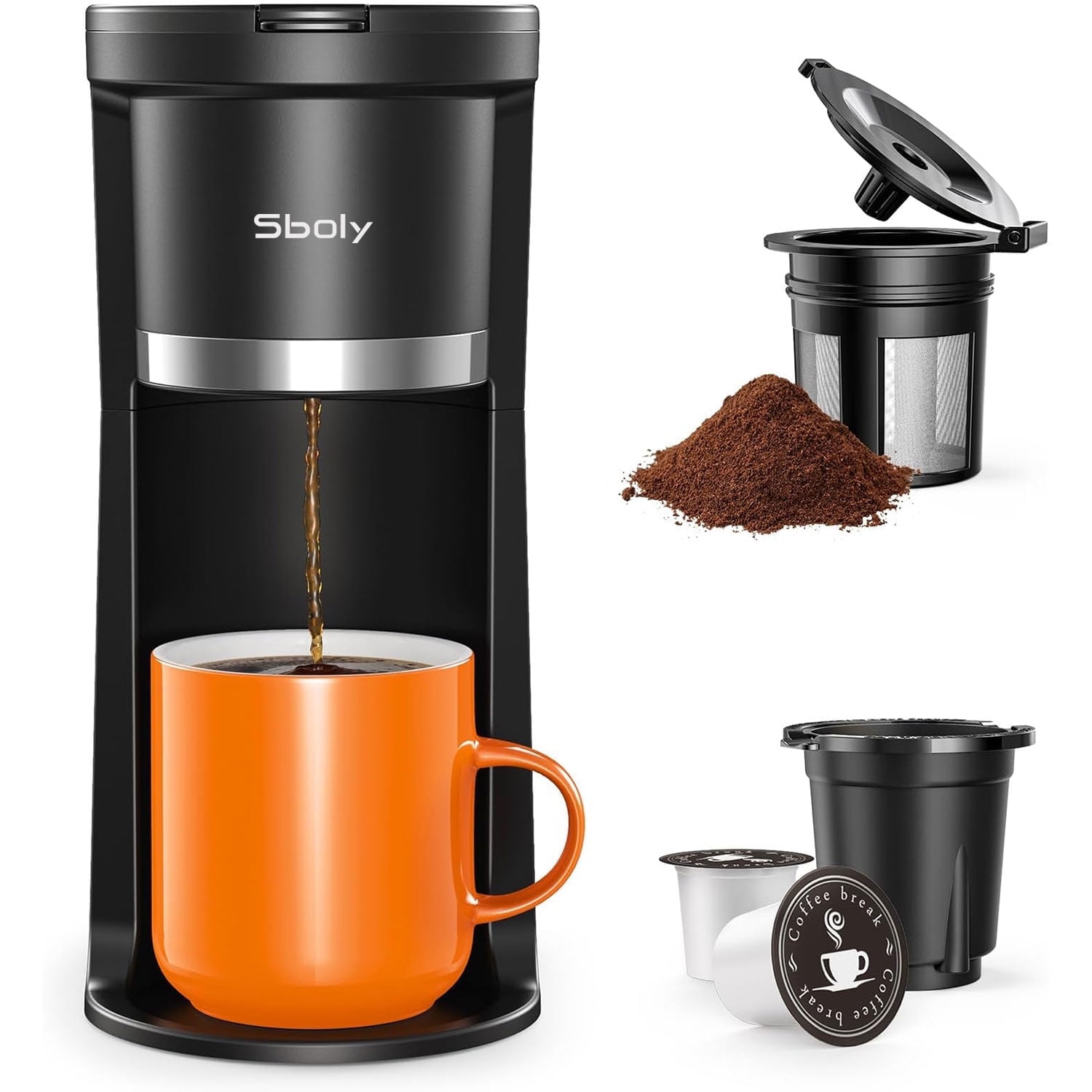
✨2 Way Coffee Maker for Pod and Grounds: Comes with a K-pod holder and a permanent filter.
✨Reusable grinding basket: The brew basket with reusable a stained steel filter net. Also dishwasher safe.
✨Water Level Indicator & Multiple Brew Sizes: Equipped with a clear water window that displays measurements from 6 to 12 oz.
✨Fast brewing: 2-Mins Instant Brew Technology & 1-Button Operation quickly brews a cup (12 oz).
✨Easy to Carry: Compact design coffee maker (4.3\" D x 7.8\" W x 9.4\" H)
✨Descaling Reminder & Self-Cleaning: the built-in descaling reminder will alert you by lighting up red. Simply add some descaling solution and press the buttons for 2 seconds, and it will start the cleaning process. This feature can avoid clogging problems and effectively prolong the life of this k pod coffee maker.
✨Usage tips: For the first use, run a brew cycle with just water, without adding coffee. This will help clean the 1 cup coffee maker and better extract the essence of the coffee. It can ONLY be used under US standard voltage 110V-120V, a voltage converter is needed if used in other countries.
☕Using Your Coffee Maker for the First Time☕
??Check that all accessories are there and the appliance is not damaged
??Fill water into the water reservoir to the Max level and close the lid.
??Place the Capsule Holder or ground coffee filter in place. Do not use a capsule or add any coffee grounds.
??Press the ON/OFF button to brew water, then discard the water.
??Clean and dry all detachable parts thoroughly.
☕Brew Your First Cup Using a Capsule☕
??Add desired amount of water into the reservoir. Do not fill past the Max fill lines. The recommended amount of water to brew a capsule is 8-100z. Do not place any liquid other than water in the water reservoir. Close the lid and place your mug on the drip tray.
??TIP: Be sure to keep the mug in place at the end of the brewing cycle to catch any excess drips. The end of the brewing cycle is indicated when the ON/OFF button is no longer illuminated.
??Plug in unit. The ON/OFF button will flash 3 times.
??Lift the Release Lever to unlock the top cover. Insert a capsule into the capsule holder. Place the capsule into the holder and push down with enough force until the bottom of the capsule is punctured by the exit needle. Make sure the capsule top is level with the edge of the holder.
??NOTE: Never remove or puncture the foil lid before inserting into the coffee maker. If the top cover is not properly closed, the capsule puncturing mechanism will not lower and latch.
??Place the capsule holder into the brewer. Make sure to place the handle of the holder horizontally inside the brewer, otherwise the lid is unable to cover.
??Press the top cover down with both hands to close it, making sure it is completely closed.
??Press the ON/OFF button to brew. The brew cycle will now begin and the indicator light will illuminate solid while the brewer is heating. Brewing is complete when the brew indicator light is no longer illuminated. And the machine will switch to stand-by mode.
??TIP: To stop the brewing cycle at any time, press the ON/OFF button. CAUTION: Wait for the machine to cool before removing used capsules as they remain hot following the brew cycle.
☕Brew Your First Cup Using Coffee Grounds☕
??Add desired amount of water into the reservoir. Do not fill past the Max fill lines. Do not place any liquid other than water in the water reservoir. Close the lid and place your mug on the drip tray.
??TIP: Be sure to keep the mug in place at the end of the brewing cycle to catch any excess drips. The end of the brewing cycle is indicated when the ON/OFF button is no longer illuminated.
??Plug in unit. The ON/OFF button will flash 3 times.
??Lift the Release Lever to unlock the top cover. Place coffee grounds into the ground coffee filter. Never fill above the MAX marking line on the ground coffee filter.
??Place the ground coffee filter into the brewer. Make sure to place the hinge of the filter cover horizontally inside the brewer, otherwise the lid is unable to cover.
??Press the top cover down with both hands to close it, making sure it is completely closed.
??Press the ON/OFF button to brew. The brew cycle will now begin and the indicator light will illuminate solid while the brewer is heating. Brewing is complete when the brew indicator light is no longer illuminated. And the machine will switch to stand-by mode.
??TIP: To stop the brewing cycle at any time, press the ON/OFF button.
☕Brewer Features☕
??Descaling Reminder Function??
??After every 300 coffees, the brewer will indicate that it requires descaling when the descale light illuminates. But it does not affect the use of normal functions.
??To start the cleaning function by a long press the ON/OFF button for 2 seconds will cancel the alert and return the machine to ready mode.
??Water Shortage Reminder Function??
??If the water reservoir is empty, the ON/OFF button light will flash three times and then turn off. Pressing the brew button will have no effect, as the water reservoir is short of water.
??After the water reservoir is filled with water, press the ON/OFF button and restart the appliance to cancel the water shortage alert.
☕How to descale the coffee maker?☕
1️⃣Step 1: The descale light turns red, indicating that the coffee machine needs cleaning.
2️⃣Step 2: Pour 12 oz of prepared descaling solution into the water reservoir.
3️⃣Step 3: Press the button for 2 seconds to start the descaling process.
☕Important Tips☕
??It is essential to use genuine, non-expired K-pod capsules.
??Before using the product, check the puncturing needle of the capsule holder. If coffee grounds blockage is observed, it can be cleaned using a needle.
??Prior to brewing coffee, inspect the top cover of the coffee maker to ensure it is securely closed and latched before initiating the coffee brewing process.